
By Borislav Stojkov, Principal Resume Writer at Toptal
Disclosure: This review is sponsored by Toptal. Borislav tested the product firsthand, and the assessment and conclusions below are his own.
Most recruiters give a resume just a few seconds before deciding whether it's worth continuing with. Resume builders mostly try to solve that problem with flashier templates. The real problem is what the resume says once someone reads past those first few seconds, and that's where most of them fall short.
I'm Toptal's Principal Resume Writer, so I had an obvious reason to try our new AIresume builder myself instead of just taking the pitch at face value. Toptal's been placing freelance talent since 2010, working with more than 35,000 companies and over 85,000 candidates along the way. That hiring experience is built into the tool. I wanted to find out how it actually shows up, not just how it sounds in the marketing.
So I ran it through everything: the upload flow, section editing, the AI writing features, and the full template gallery, and measured it against the most popular resume builders on the market. Here's what stood out, and who I think it's for.
Toptal Resume's Career Content Services
Toptal Resume is a comprehensive set of career services aimed at helping professionals worldwide improve their career documents, with tools that include the Resume Checker, Cover Letter Generator, and Resume Builder. The foundation of that expertise includes over 3.7 million resumes analyzed and more than 470,000 interviews conducted, according to Toptal.
With that context out of the way, here's how the builder itself works, step by step.
Toptal Resume's Resume Builder: a Walkthrough
The Toptal Resume Builder offers users two paths to creating their resume: either start from scratch or upload an existing resume. They effectively follow the same logic and process, and the one I was more interested in was how it would process an uploaded document and guide me through the resume improvement flow. You can start building your resume directly from the Toptal Resume homepage, no sign-up needed. You can simply upload your resume right away, and you're inside the builder immediately. An account is only required at the very end, when you're ready to download.
Resume Upload and Content Parsing
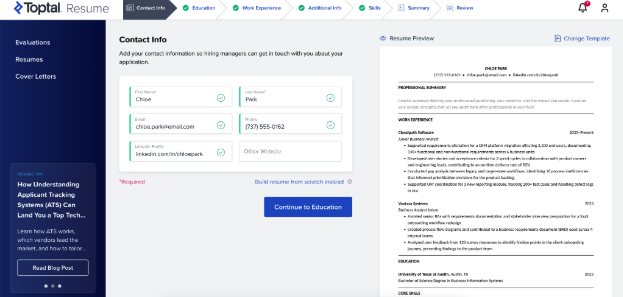
The first impression is the speed and accuracy with which the builder processes the uploaded document. Within seconds, the information from your resume is populated in a form where you can easily edit it, and the entire resume preview of the current version is displayed on the right side of the screen at the same time. That way, you can get an overall sense of its structure without disrupting the flow. Any changes you make to the content are instantly reflected in the preview, giving you a strong sense of control.
The parser places your content into predefined fields rather than trying to guess at structure. For standard sections like the Professional Summary, if your original resume didn't have one, the field doesn't just sit empty: it shows a greyed-out placeholder describing what should go there, so you know exactly what to fill in. Not every section works the same way. Additional Info covers things like certifications, licenses, and languages, and it only shows up if it was in your original resume or if you add it yourself. Unlike the Professional Summary, it doesn't appear as an empty heading.
Navigating Through Your Resume's Sections
The sections of your resume appear in a sequence that generally follows the structure of most resumes:
You can first review and edit your contact information and education details, including degree type, field of study, and institution. Contact info only has room for one additional link beyond LinkedIn, so if you want to list both a portfolio and a GitHub, you'll have to pick one.
In the Work Experience section, you can edit your background job by job, with the AI features covered in more detail below.
The Additional Info section covers things like certifications, licenses, and languages, and only appears if it was in your original resume or if you add it yourself.
The Skills section does more than list what you already have: it pulls your skills from your resume and suggests additional ones based on that same experience.
The Professional Summary section is the one exception to the usual order: it comes last in the flow, since there's an AI feature that generates or improves it once everything else is filled in, covered in more detail below. It also shows a greyed-out placeholder if your original resume didn't have one, so you know exactly what to fill in.
You're picking from a set list of sections here, not creating your own. Include a section only if it actually helps your case for the role you want, and skip it if it doesn't. Whatever you add shows up in the order set by your chosen template.
Section titles stay visible the whole time, so you can jump between them without losing any data. If you skipped something earlier, just click back to that section, make your edit, and pick up where you left off.
Resume Templates Gallery
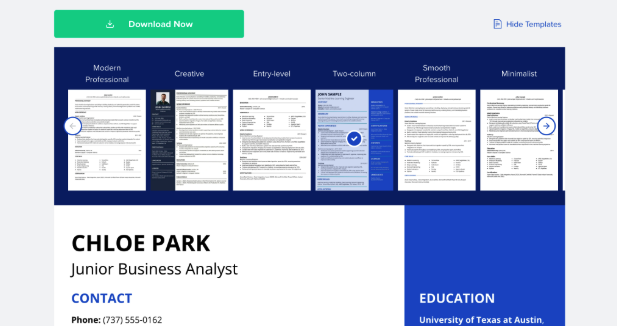
At any point in the process, you can select the "Change Template" option and immediately see in the resume preview how it will look with different resume templates. That wasn't a surprise, given the overall experience with the speed and the ability to track what you're doing throughout the entire flow.
The templates can be split into two categories:
One-column, clean, standard resume templates that we often call ATS-friendly resume templates.
More creative resume templates that include sidebars in different colors, and even the possibility to upload your picture.
Toptal Resume keeps this gallery small on purpose. Every template goes through internal review by Toptal Resume's own team of recruiters, and each one is also tested directly against major applicant tracking systems like Workday and Greenhouse, not just Toptal Resume's own evaluation tool, the same one any user can access to test their own resume. That means fewer templates to choose from for now, but everything in the gallery has been checked against real hiring software rather than just added for volume.
There's an ongoing debate in the industry about the compatibility of resume templates with applicant tracking systems (ATS). While some argue that a resume's design should be minimal, AI is changing how complex formats are read. Also, not every applicant encounters an ATS scanner in the hiring process, and many are applying through direct referrals or recruiter outreach.
Both approaches are covered, even if the gallery itself stays on the smaller side.
AI Features: the Star of the Toptal Resume Builder
As mentioned above, Toptal Resume's AI features play a crucial role in upgrading your resume. The most striking aspect of it is when you're editing the work experience section, but some AI-based improvements are available throughout the entire resume-building flow. Here's a breakdown of the most important ones.
Rewriting the existing content
First, there's the "Revise With AI" button that lets you rewrite the existing section using AI, which might not be a groundbreaking feature, but it can be very useful to help you phrase the content according to established resume writing standards and expectations. You can also use it across sections, not only when rewriting your past jobs.
Expanding and upgrading work descriptions
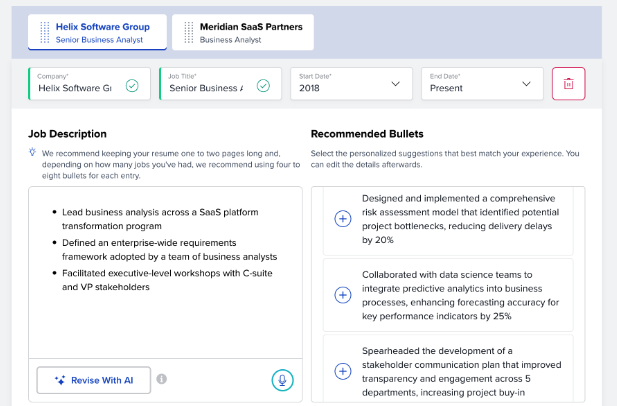
What really stands out is the “Recommended Bullets” for each job entry in the work experience section. Based on the role title and other details extracted from your original resume, the tool provides personalized bullet points to improve your descriptions. They’re not generic lines that can work for every position, but suggestions tailored to the role, company context, and industry.
They also follow best practices for strong resume bullets, suggesting that you include the skills used and results achieved through your work. The tool can suggest complete bullets, including numbers, which you can then edit to match your actual experience and results.
Here's a real example from testing. For a Senior Business Analyst role with bullets like "Lead business analysis across a SaaS platform transformation program," the tool suggested 10+ bullets to add, including: "Designed and implemented a comprehensive risk assessment model that identified potential project bottlenecks, reducing delivery delays by 20%."
Tailoring the Professional Summary
The unique Toptal Resume's AI kicks in again when you want to adapt the Professional Summary of your resume. In addition to the option to rewrite the existing one, it offers a personalized summary of your entire resume, highlighting the most important aspects of your document. That’s also why saving this section for last was a good idea.
Toptal Resume Builder vs. Other AI Resume Builders
Many resume builders available online today are primarily self-serve template tools. That means that you bring the content, and they provide the design and formatting. Toptal Resume takes a different approach that combines both.
| Tool | Features | ATS-Friendly Templates | Starting Price | Trustpilot Score |
|---|---|---|---|---|
| Toptal Resume | AI-tailored bullets and recruiter-approved templates | Yes | $0.99 (7-day trial), then $13.95/month on annual plan | 4.8 |
| Resume.io | AI phrase suggestions & rewriting | Yes | $2.95 trial, then $29.95 every 4 weeks | 4.2 |
| Kickresume | GPT-assisted writing | Yes | Annual plan from $8/month (requires full-year $96 initial payment) | 4.6 |
| ResumeGenius | AI content suggestions | Yes | $2.95 for a 14-day trial, then $23.95 every 4 weeks | 4.6 |
| Teal | AI-assisted writing | Yes | Teal+ $29 every 30 days | 4.1 |
| Rezi | ATS-focused optimization | Yes | Pro plan $29/month | 4.6 |
Note: The information in this table reflects publicly available information at the time of writing and may change over time.
The resume builders you can find on the market today offer some form of AI writing assistance. What seems to be the difference is not whether a tool uses AI, but what that AI offers and how it's designed to work. Toptal Resume's guidance comes from professionals who have worked across the hiring process, which means the AI guidance reflects how resumes are really evaluated, and not just how they're formatted.
Toptal Resume Builder Pros and Cons
After having tested the entire resume-building process and all the features of the Toptal Resume Builder, here are the most important reasons to give it a try:
The real-time preview updates instantly as you edit, so you always have a clear picture of the final result.
AI suggestions built around actual role and industry context, not generic phrasing that could apply to any job title.
An effortless, guided flow that still leaves you in control of the process.
Backed by Toptal's hiring expertise: the recommendations reflect what actually gets read and scored, not just formatting rules.
As for the cons, there are a couple of potential areas for improvement:
The Toptal Resume Builder is currently available in English only, though multi-language support is in active development.
This is an AI-driven tool, so it's not the right fit if you want a fully human-written resume. It's also not built with portfolio-style formats in mind, so both needs are better served elsewhere.
You can build and use the tool for free, but downloading requires a plan, starting at an affordable $0.99 for a seven-day trial.
A smaller template gallery than some other competitors, and convenient options like LinkedIn import aren't available.
Final Verdict
Toptal Resume is a full-service career platform, and its AI tools are designed by people who've actually worked in hiring. It's built for candidates who want outcomes, not just a template. Having a well-rounded set of career documents is a big plus: in addition to the resume checker, which provides a thorough analysis of your resume, the cover letter builder from the same team can be very handy.
It's not the right fit for everyone. If you need a resume in a language other than English right now, or a completely free tool, you might want to look elsewhere for the time being. Visual and creative professionals who need a portfolio-first presentation and executives who want a fully human-written resume are also better served elsewhere.
Toptal Resume Builder offers a fast, guided resume-building process, with AI-assisted features to help you generate content that adds substantial value from a recruiter's perspective. The selection of templates covers most typical needs across all application strategies, and the suggested information for inclusion is tailored to your actual experience. If you're looking for a service that covers the resume writing process, design, ATS compatibility, and keyword matching, Toptal Resume is definitely worth a try. Picture a mid-career professional with solid results to show for their work but a resume that undersells them: that's exactly who this tool is built for.
About the author: Borislav Stojkov is a Principal Resume Writer at Toptal. His professional track record includes personally reviewing and rewriting more than 2,000 resumes for professionals across industries. In his direct work with clients and the development of AI-based resume-writing services, he focuses on ATS-optimized structure, modern template design, and recruiter-aligned writing and formatting standards.
Methodology
For this review, I tested Toptal Resume Builder firsthand, step by step: the upload flow, every editable section, all three AI writing features, and the full template gallery, working through it with a real, complete resume. The screenshots provided use a sample resume based on a real-world example rather than an actual candidate's resume, since real candidate data can't be shared for confidentiality reasons.